windows 8

Make Windows 8 Much Easier and Quicker to Use

Windows 8 can be frustrating because nothing seems to be where it used to be. Here are three tricks that help you find things. They will make ordinary tasks much easier to carry out. One of the annoyances of Windows 8 is trying to find all the various system settings. Readmore...

Blocked Sites

How to -- Bypass/Access Blocked Websites At College/Office

The scenario has changed a lot over the past decade.Internet has grown into a vast resource and with search engines like google it hasn’t been so easy to search for anything about anything on the internet. Internet has become more addictive with the advent of social Readmore..

Windows 8

Windows 8 Direct Download Links

Microsoft has recently released Windows 8 RTM Enterprise for 32-Bit (x86) And 64-Bit (x64) Version. The evolution provides Readmore...

Top Blogger

World's Top 5 Bloggers

Blog Owner : Pete Cashmore
Estimated Unique Monthly Visitors : 42,000,000
Income : $ 10,00,000 Month
Readmore...

Hard Disk

Different types of Hard Disk Drive

Hard Disk Drive - It is a non-volatile storage device which stores digitally encoded data on rapidly rotating platters with magnetic surface.
Types of HDD :
IDE : Integrated Drive Electronics. IDE drives are also known as PATA drives Readmore...

Wednesday, 22 February 2012

Wi-Fi


Wi-Fi or WLAN (Wireless Local Area Networks) is a wireless network based on a series of specifications from the Institute of Electrical and Electronics Engineers (IEEE) called 802.11. Wi-Fi uses unlicensed radio frequency, mostly in the 2.4GHz band. It enables a person with a wireless-enabled computer or PDA to connect to the Internet via a wireless access point. The geographical region covered by one or several access points is called a hot spot. Wi-Fi was intended to be used for mobile devices and local-area networks, but it is now often used for Internet access outdoors. Several cities, including Philadelphia and San Francisco, plan to install citywide Wi-Fi systems for use by all citizens in each municipality. There are several types of Wi-Fi:
  • 802.11a (offering transmission speeds of 24mbps to 54mbps)
  • 802.11b (6mbps to 11mbps) and 802.11g (24mbps to 54 mbps)
  • 802.11n (50mbps to 100mbps) is a proposed specification that will become a Wi-Fi standard once it’s finalized by the IEEE, and the Wi-Fi Alliance completes its interoperability testing.

Download ppt HERE
Continue reading →
Tuesday, 21 February 2012

The Cleverest Geeky Windows Tricks Everyone Should Know


Use the Secret Send To Menu Items

When you right-click on any file or folder, you can use the Send To menu to create a zipped version, or send the file to an application, but in Windows 7 there are hidden items on the Send To menu that can't be seen by default.

All you have to do is hold down the Shift key, then right-click on a file and access the Send To folder—you'll see a whole bunch of new items in the list, like special folders, and even an item for each one of your drives. It's a really useful tip for quickly sending a file to the flash drive you just plugged into the PC, without having to do anything else.

Open a Command Prompt from Any Folder

This is one of those tips that most real geeks already know, but chances are there's somebody reading this that doesn't know about it—if you hold down the Shift key while right-clicking on any folder, including the desktop background, you'll see a new item for "Open command window here", that will open a command prompt with that folder as the default path. This tip only works in Windows 7 or Vista.

Hide Secret Data Inside Any File

There's any number of great ways to hide data from prying eyes—TrueCrypt, anyone? But if you want to simply hide some text data inside a secret "compartment", you can abuse the Alternate Data Streams feature in the underlying NTFS file system. All you have to do is open up a command prompt, and then use a command similar to this:

notepad SomeFile.txt:SecretWordHere.txt

The special filename with the colon and second filename tells NTFS to actually store the data in an alternate stream, instead of the regular file. You can put whatever you want into the file, and nobody will be able to access it unless they know the command to retrieve it.

Tile or Cascade Specific Windows

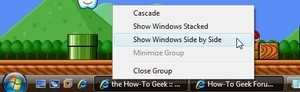
Sure, Windows 7 has the awesome Aero Snap feature that lets you drag windows to the side of the screen to fill one side, but what if you want to cascade them, or tile them stacked on top of each other?

Back in the XP and Vista days this was relatively simple—you could hold down the Ctrl key while selecting multiple windows on the taskbar, and then right-click on any of them to tile or cascade them. For Windows 7, you can do the same thing, but you'll need to open up Task Manager instead, hold Ctrl, select the open windows, and then you can cascade them from there.

Undo an Accidental File Move or Deletion With the Keyboard

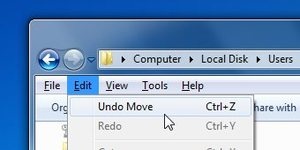
Have you ever tried to select a bunch of files while holding the Ctrl key, and then accidentally copied all of them because you slightly moved your mouse? Maybe you just deleted a file and don't feel like hunting it down in the Recycle bin. In either case, you can use the Ctrl+Z shortcut key to immediately reverse whatever you didn't mean to do.

Readers will probably point out that you can also do this from the context menu in Windows 7, but it's surprising how many people don't realize the keyboard shortcut works. 

Keep Connected to find out new unknown Windows Tricks.
Continue reading →

Top 5 must-have desktop Gadgets for Windows 7


1: Facebook Explorer

Facebook Explorer, can be configured to run in a smaller or larger width and one of three heights, and you can specify how often you want updates (from every one to 60 minutes). It gives you a compact view of your own status and information or friends’ activities, as shown in two views of the gadget in. You can also update your status in the flyout.


2: Clipboard Manager

Clipboard Manager  looks slick and is feature-rich. You can customize the background to fit your desktop, and not just the color; you can use a photo as the background if you prefer.
You can save up to 999 clips (that’s a lot of clips!) and you can delete any clip or send it to the Clipboard or to your Favorites list with a right click. The Favorites feature lets you create boilerplate text you use often. I also like the ability to mark clips with timestamps. And unlike the old Clipboard gadget, this one supports images as well as text. It even has a privacy mode, which prevents clips from being displayed on the main gadget so that passers-by who glance at your desktop can’t see what you’ve saved to the clipboard.


3: App Launcher

One aspect of Windows 7 that annoyed and frustrated many users was the omission of the Quick Launch toolbar. If you’re like me, for years you’ve relied on the Quick Launch bar to access your frequently used programs. There is a way to get Quick Launch back, but unlike with previous versions of Windows, you can’t separate the Quick Launch bar from the main Taskbar. That means it takes up precious space on the Taskbar that you might need for open programs, system tray items, etc.
Enter the App Launcher gadget . It serves the same purpose as the Quick Launch bar but can be placed anywhere you want on the desktop. You can add whatever programs you want by dragging them to the gadget, configure the number of icons to display per row and whether to center them, and change the background image.


4 : Shutdown Gadget

Don’t go to Start menu to shut down. You can Shutdown/Restart/Logoff in a single click by using this gadget.


5 : All CPU Meter

All CPU Meter isn’t as complex as some, but the simplicity works in its favor. It monitors your memory usage as well as CPUs, and it packs a lot of information into a small space. I also like that you can change the background color to match your preferences.


Continue reading →
Monday, 20 February 2012

Examination Management System


As we all know that time is very precious and no one is ready to waste his time .so we are designing a project that will help to save the time of people in schools and colleges.The project helps the teachers to make the results of the students easily and quickly. This software is designed to enter the marks and other details by only entering the rollno of the student.The whole details of the class can be seen easily.Also the toppers and failures can be easily known of the class. This software will help to save the time and also decrease the mistakes that are made manually .So we hope that this software will help to save the Time and data.

Written in C

Download HERE

Continue reading →
Sunday, 19 February 2012

Payroll Management System


In the existing system, most of the records are maintained on paper. It becomes very inconvenient to modify the data. In the existing system, here is a possibility that the same data in different registers may have different values which means the entries of the same data do not match. This inconsistent state does not supply the concrete information which poses a problem in the case information related to particular search record.

Our project is very useful. User is no longer required to check his register in search of records, as now it can be searched over the software by choosing some options. The user need not to type in most of the information. He/she is just required to enter the desired options. On the whole it liberates the user from keeping lengthy manual records. In a nutshell, it abates the work load of an organization.

In today’s world, no one likes to perform calculations on calculator or manually when computer is there. Every one wants his/her work to be done by computer automatically and displaying the result for further manipulations.

Written in C
Download HERE
Continue reading →

15 Best Websites To Download Free E-Books


Ebooks are the most popular and cheapest source of constructing meaning in order to gain knowledge. Especially free EBooks are in high demand these days as people like to read on laptops, palm tops, iPads, iPods and iPhones etc. 
So because EBooks are the best and cheapest way to gain knowledge, we are going to list out 20 best sites which allow you to download free EBooks. Take a look at these sites and download your free Ebook today-

Free Ebook Download Links intends to provide links for downloading books available free in different format.The books are published online by their authors for free viewing and printing for non-commercial proposes only.


2. eBoook3000 
A library of free ebook downloads with over 17 categories available.
      
3. PDF Search Engine 
PDF Search Engine is a book search engine search on sites, forums, message boards for pdf files. You can find and download a tons of e-books by searching it or browsing through the full directory.
       
       
 4. SlideShare
SlideShare is the best way to share your presentations with the world. Let your ideas reach a broad audience. Share publicly or privately. Add audio to create a webinar.
eSnips is the one place where you can share anything you want, about any topic: your thoughts, your photos, your music, your videos, your flash files, stuff you find on the web, and many other media types. You can search and download for free documents in eSnips as well. 


6.Book Gold Mine
Book Gold Mine serves a large collection of quality e-books, lectures, notes, and other kinds of documents at no cost to the user.


7. eBooks-Space


Free downloadable ebooks for computer IT, programming lauguages, software development, tutorial, database design in PDF-CHM file format.


8. drebooks
The vision of the founder was to provide an online space where Medical Students and Doctors could gather to share and collaborate their information and ideas about medical books.
9. E-Books Directory
E-Books Directory is a daily growing list of freely downloadable ebooks, documents and lecture notes found all over the internet. You can submit and promote your own ebooks, add comments on already posted books or just browse through the directory below and download anything you need.

10. UFindBook 
UFindBook offers free ebooks download more than 200,000 titles categorized in format of pdf, chm, html.
Books-PDF provides free ebooks for .Net, 3D animation, accounting, AJAX, algorithms, ASP.NET, AutoCAD, C#, C++, Database and etc.
PDFoo.com was developed for free services to provide resources of PDF files. All files based on popular section and it short by number of the most download by people. Browse through the category section will lead you find the PDF files that you are looking for. Every time people download, or system will counting how many times it has download by people.
Free Ebook Down offers over 10,000 free ebooks in 22 categories.
14. eBooks Download Free 
ebooks download free is One of the biggest books sharing websites that contains large collection of pdf and chm books free download you can download free books in many categories: Computer books like free php ebooks to download, ADO.NET, AJAX, java, ajax, photoshop, javascript Exchange Server, Sharepoint , ASP.NET XML free books downloads, c# and c+ books.
PDFGeni is a dedicated pdf search engine for PDF ebooks, sheets, forms and documents.


Continue reading →